Scheduling: 24/7 operation, night setback and after-hours fan energy
Workbook exercise air-scheduling · PNNL re-tuning chapter 5 · about 35 minutes
Goal
Compare one building run two ways: around the clock, and with a night setback. Find out whether CAMBER can tell a fan that never stops from one that cycles at night only to hold the setback temperature, and measure what the setback saves in after-hours fan energy.
Learn more
Read these first (PNNL, free):
- Occupancy Scheduling, the re-tuning guide on night and weekend setback and supply-fan cycling during unoccupied hours: its questions ask whether the units run when the building is empty, and whether the fans cycle to hold a setback rather than run continuously.
- Chapter 5: Air Handling Units of the re-tuning training, for scheduling as a re-tuning measure.
Datasets and licence
ornl-frp-ops: ORNL's two-storey research office (one DX rooftop unit and ten VAV boxes with electric reheat), measured at one-minute resolution for about a week per operating scenario. Licence CC-BY-4.0 (open; cite it). The default subset, the heating-season baseline and night-setback tests, is about 14 MB. See its data issues.
The equipment used: the rooftop unit of each test, RTU__base_heating (the 24/7 baseline) and
RTU__sb_heating (the night setback), in ds-ornl-frp-ops. The tests' schedule is occupied
07:00-22:00 every day; the setback test turns the unit off from 22:00 to 07:00 with a 15.6 °C
(60.1 °F) heating setback.
Setup
In the lab
- Run
camber laband open the URL it prints (http://127.0.0.1:8765/lab?token=...). - Tick
ornl-frp-opsand press Fetch & ingest. - When the job is done, the row links to trends and report. This exercise uses the dataset's default config, so the report shows its findings.
On the command line
camber datasets fetch ornl-frp-ops
camber datasets ingest ornl-frp-ops --store lab_store
camber datasets config ornl-frp-ops --store lab_store --out ops.json
camber run ops.json --out ops_out
The config runs two rules on each rooftop unit at one-minute resolution:
night_weekend_setbackcompares the supply fan's runtime in unoccupied and occupied hours. When the fan does run at night, it then asks whether it cycles (runs part of each hour) and whether the space it serves sits at the setback temperature rather than at daytime comfort; a unit with no zone sensor is judged on its return air while the fan runs.compressor_short_cyclecounts the DX compressor's starts per day.
Steps
- Look first. In the trend viewer, plot each unit's supply-fan status and return-air temperature over two nights.
- Run the config and read the findings.
- Setback. Read
night_weekend_setbackon both units:fan_run_unoccupied_pct,setback_basis,unoccupied_duty_when_running_pct,zone_temp_unoccupied_fandzone_temp_occupied_f. - Compressor. Read
compressor_short_cycle:starts_per_dayandruntime_pct. - After-hours energy. Average each unit's supply-fan power (
power, kW) by hour of day and add up the hours from 22:00 to 07:00: the fan's energy in an average night. In Python:
from camber.loadprofile import daily_profile
from camber.store import ParquetStore

store = ParquetStore("lab_store")
for unit in ("RTU__base_heating", "RTU__sb_heating"):
    frame = store.read_role_frame(facility_id="ds-ornl-frp-ops", equip=unit)
    profile = daily_profile(frame["power"])
    print(unit, profile[(profile.index < 7) | (profile.index >= 22)].sum(), "kWh")
Questions
- What does CAMBER say about the 24/7 baseline's night operation?
- In the setback test the fan still runs during a large share of the night. Why does CAMBER call the setback effective anyway? Which evidence decides it?
- How much supply-fan energy does an average night use in each test?
- The compressor short-cycles in both tests. Is scheduling the fix? What is?
- What would you have to know before promising the night saving to a building owner?
What CAMBER shows
- Findings.
night_weekend_setbackreports the unoccupied and occupied runtime, the verdict basis (runtime, orheld_setbackwhen the fan cycles to hold the setback), the fan's duty in the night hours it runs, and the return-air temperatures it compared;compressor_short_cyclereports starts per day against a 12-a-day threshold. - Caveats. With no trended occupancy the rule uses the schedule in the config (07:00-22:00, every day), and says so.
- Report.
camber report ops.json --out ops.htmlshows the findings as a report, with their evidence charts; add--layout rcxfor the printable RCx report, with a page per issue.
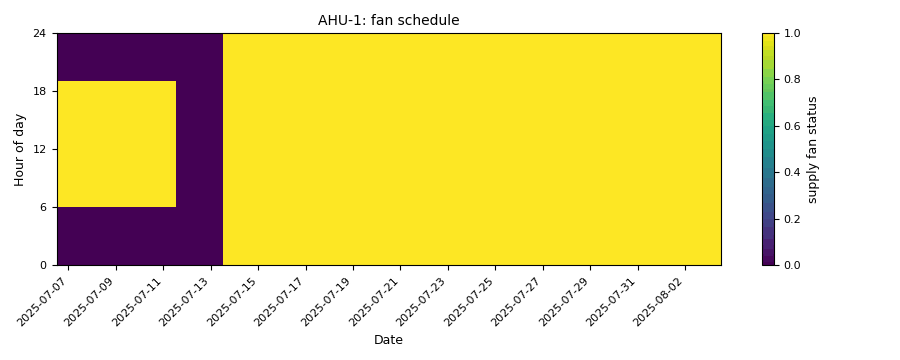
Synthetic illustration, not this exercise's dataset: the night_weekend_setback evidence carpet of the supply-fan status. The first week follows a weekday schedule; from the second the fan runs nights and weekends.
Caveats
- The building was unoccupied during the tests, with no internal gains: the "daytime" load is the envelope alone.
- The two tests ran in different weeks (the baseline in March 2021, the setback in January 2022), so the weather differs. The night-energy comparison is not a weather-normalized saving.
- Only the supply fan's power is mapped for the energy step; the compressor and the electric reheat also run at night in the setback test.
- The return air stands in for the space temperature: it reads the rooms only while the fan runs.
Going further
- Fetch the
fullsubset: it adds the cooling-season baseline and setback, a morning pre-heat and free-float tests. Compare the cooling-season setback verdict with the heating one. - Change
start_hour/end_hourinops.jsonto a normal office day (07:00-18:00) and see how the verdicts change: the schedule you judge against matters. - Whole-building meters show the same thing at the scale of a campus: the practice exercises use
bdg2for load profiles and after-hours base load.