Are the trends good enough? Point coverage and sensor health
Workbook exercise data-trend-quality · PNNL re-tuning chapters 3 and 4 · about 60 minutes
Goal
Before you judge a single sequence, judge the data. Check which of the points a re-tuning analysis needs each unit actually trends, then let CAMBER's sensor-health layer find the points you should not believe: a copied point, a mixed-air sensor that fails its energy balance, a reading clipped at full scale, a value held for a day and a half, a gap-filled stretch. Finally, look at one "untrusted" verdict that is not a sensor fault at all.
Learn more
Read these first (PNNL, free):
- Trending Requirements for Re-Tuning: which points to trend, at what interval and for how long. Question 1 asks you to hold the three units against it.
- Chapter 3: Collect Initial Building Information of the re-tuning training, for what to gather before trending starts.
- Chapter 4: Trend Data Collection and Analysis, for how the trends are then read.
Datasets and licence
nuig-ahu101: a real 100 % outdoor-air handler serving one lecture theatre, 14 months of BMS trends. Licence CDLA-Permissive-1.0 (open). About 120 MB to download. See its data issues.lbnl-b59: three years of a real office's four rooftop units, zone CO2 and electricity meters. Licence CC-BY-4.0 (open; cite it). A manual download of about 260 MB (the repository serves it only to a browser;camber datasets info lbnl-b59says how). See its data issues.irish-ahu: one real mixing-box air handler at an industrial site, 2017-2022. Licence CC-BY-4.0 (open; cite it). About 22 MB. See its data issues.
The equipment used: AHU101__ahu101 (facility ds-nuig-ahu101); RTU01 to RTU04, the zone
RTU01_zone_022 and the south lighting meter ELE_lig_S (facility ds-lbnl-b59); AHU__ahu
(facility ds-irish-ahu).
Setup
In the lab
- Run
camber laband open the URL it prints (http://127.0.0.1:8765/lab?token=...). - Tick
nuig-ahu101andirish-ahuand press Fetch & ingest. Forlbnl-b59, download the files by hand first (see the command line below), then ingest from that folder. - Each row links to trends and report. The trend viewer is where you will look at the points the health checks name.
On the command line
camber datasets fetch nuig-ahu101
camber datasets fetch irish-ahu
camber datasets ingest nuig-ahu101 irish-ahu --store lab_store
camber datasets ingest lbnl-b59 --from-dir b59_download --store lab_store
(b59_download is the folder holding Building_59.zip and README_Dryad_Bldg59.txt.) Then
write each dataset's own config and build its RCx report. Page 2 of each report, Data coverage
and sensor health, holds the trust table this exercise reads:
camber datasets config nuig-ahu101 --store lab_store --out nuig.json
camber report nuig.json --layout rcx --out nuig_rcx.html
camber datasets config lbnl-b59 --store lab_store --out b59.json
camber report b59.json --layout rcx --out b59_rcx.html
camber datasets config irish-ahu --store lab_store --out irish.json
camber report irish.json --layout rcx --out irish_rcx.html
The report's trust table covers the air-handler points. For the others (a zone's CO2, a meter) and for the screens the report does not run, read the same store in Python:
from camber.model.roles import Role
from camber.sensorhealth import frame_sensor_health, gapfill_signature, sensor_trust
from camber.store import ParquetStore

store = ParquetStore("lab_store")
rtu = store.read_role_frame(facility_id="ds-lbnl-b59", equip="RTU04", resample="1h")
for role, t in frame_sensor_health(rtu, gate="fan", plant_gate="auto", mode="auto").items():
    print(role.value, t.verdict, round(t.trust, 2), t.flags)

zone = store.read_role_frame(facility_id="ds-lbnl-b59", equip="RTU01_zone_022")
print(gapfill_signature(zone[Role.CO2], Role.CO2).summary)

light = store.read_role_frame(facility_id="ds-lbnl-b59", equip="ELE_lig_S")
print(sensor_trust(light[Role.POWER], Role.POWER).stuck_intervals)
Steps
- List the points. For each unit, list the roles CAMBER stored (the trend viewer's point
list, or
store.read_role_frame(...).columns). Compare them with this core air-handler list: outdoor, mixed, return and supply air temperature, the supply-air setpoint, the outdoor-air damper, the cooling and heating valves, a supply-fan status or speed, duct static pressure and its setpoint. Then check your list against PNNL's trending guide. - Read the trust tables. Open page 2 of each RCx report. Note every point that is not trusted, and its flags.
- Find the copy. In
b59_rcx.html, one return-air point carries acopied_signalflag. Open that unit's return and supply air in the trend viewer and find where they become one line. - Check the mixing balance. Two B59 mixed-air sensors are flagged
mixing_balance. That check needs the supply and outdoor-air flow stations; read the caveat on it in Sensor health. - Find the ceiling. Plot
AHU101__ahu101's room CO2 with its supply-fan status. Look at the highest values and what the fan was doing then. - Find the held value and the filled stretch. Run the Python above on
ELE_lig_Sand onRTU01_zone_022; also rungapfill_signature(status, Role.SUPPLY_FAN_STATUS)onAHU101__ahu101's supply-fan status. - Question a verdict. In
irish_rcx.htmlread the supply air's gated and ungated cells and the Gate used column. Then score the same hourly series with plainsensor_trustand withframe_sensor_health(frame, mode="auto"), and compare the flags.
Questions
- Which of the core points does each unit (
AHU101__ahu101,RTU01,AHU__ahu) not trend? Which B59 point is trended for only part of the record, and from when? - Which B59 return-air point is a copy of another point, and how does CAMBER decide which of the two is the copy? What does that do to its trust score?
- Which mixed-air sensors fail the flow-weighted mixing balance? Why is that verdict capped at suspect, never untrusted?
- What is the highest room CO2 reading on
AHU101__ahu101, how many stored samples read it, and what was the supply fan doing? Is that a measurement? How does the trust table name it? ELE_lig_Sis flagged stuck. How long are its held stretches, and on what day of the week do they start? Is the meter broken?- What does
gapfill_signaturesay aboutRTU01_zone_022's CO2, and about the nuig fan status? Which of the two do you believe, and what do you make of the repeats it does not explain? - Why does plain
sensor_trustcallirish-ahu's supply-air temperature untrusted while the RCx table calls it trusted? What do thestray_leadflag and the per-mode read each change? Is the sensor bad?
What CAMBER shows
- Trust table (RCx report page 2): each point's verdict (trusted, suspect,
untrusted), score and flags, scored on fan-on samples (gated) and on all samples, and which
fan signal the gate used (or
ungated — no fan signal). frame_sensor_health: the same scores for every role of one unit, with the frame-level checks (copied_signal,mixing_balance,all_points_frozen...) in each point'sframe_checks, andfirst_valid/window_coveragefor a point that starts late.sensor_trust: one point's score, withstuck_intervals(start, end, hours, value) for every held stretch longer than its role's limit.gapfill_signature: a screening verdict, with each 30-day window's class (quantised, continuous, mixed), the whole days that repeat exactly, and, for a stepwise point, the days that follow a fixed schedule (scheduled_days), which are not counted as repeats.- New flags (0.98):
clipped(a pile-up at a round-number range limit, named inSensorTrust.clipped),stray_lead/stray_tail(rows beyond a long gap, left out of the judgement), and, on a unit with no fan point, an outlier read per inferred operating mode (SensorTrust.mode_source). - Ingest notes:
camber datasets ingestprints each quirk it annotates or fixes; the catalog's data issues say why.
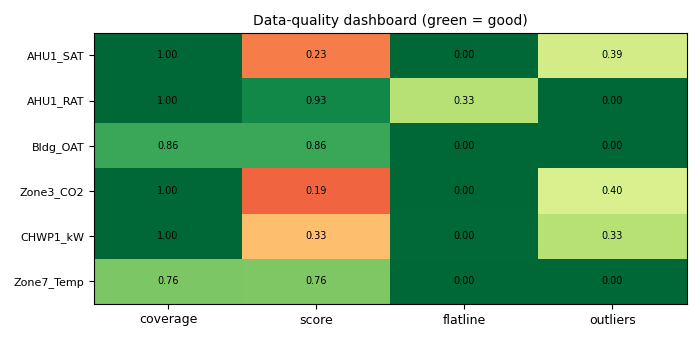
Synthetic illustration, not this exercise's dataset: CAMBER's data-quality dashboard for six trends with the usual problems: a return-air sensor held for a week, CO₂ spikes, a three-day gap in the outdoor temperature, a point trended from day six.
Caveats
- Every health verdict is a prompt to look, not a diagnosis. Suspect means "check this before you rely on it", and a flag can have an innocent cause (see questions 5 to 7).
- The mixing balance trusts the flow stations, whose own accuracy is unknown, and cannot say which of the mixed, outdoor or return sensors is wrong.
gapfill_signatureneeds the raw trend. Hourly means erase the granularity signature, so run it on the stored grid, never on a resampled frame.- CAMBER's ingest already fixes some problems (
irish-ahu's sentinel temperatures and its outages logged as zero,lbnl-b59's gap-filled early outdoor-air flow). You are reading the corrected data;--no-correctionskeeps the data as published. - The core point list above is CAMBER's role list, not PNNL's text: the trending guide is the reference.
Going further
- Ingest
irish-ahua second time with--no-correctionsinto another store and compare its outdoor and return air trust with the corrected ingest. - Run
cross_unit_identity(see Sensor health) on the four B59 supply-air flows and decide whether "four units at one common fan speed" explains what it reports. - Set
"trust_gate": {"min_trust": 0.5}inb59.jsonand see which findings decline.