Heating plant lockout: a boiler and a pump left on in warm weather
Workbook exercise plant-lockout · PNNL re-tuning chapter 8 · about 30 minutes
Goal
Find a boiler left enabled through a warm spell and a hot-water pump left running with its boiler locked out: two faults no open dataset in the catalog shows. Then find out how much the verdict rests on the lockout temperature you choose, and read where each plant really stops firing.
Learn more
Read these first (PNNL, free):
- Central Utility Plant Heating Control, the re-tuning guide: its advice to shut comfort-only boilers, and the pumps that serve them, down in warm weather is what this exercise checks.
- Chapter 8: Central Utility Plant of the re-tuning training.
Datasets and licence
synthetic-hw-plant-lockout: a synthetic hot-water plant that CAMBER generates on your computer. Nothing is downloaded and no real building is behind it. It holds hourly outdoor temperature, burner firing and gas input, hot-water pump status and speed, and the loop supply and return temperatures, for eight weeks of late spring with a warm spell. Licence Apache-2.0 (CAMBER's own; the data may be shared). About 0.3 MB. See synthetic datasets for how CAMBER generates it.
The same weather drives four plants, each ingested as PLANT__<plant> in the facility
ds-synthetic-hw-plant-lockout: PLANT__locked_out, PLANT__warm_spell,
PLANT__pump_left_on and PLANT__low_lockout. Which is which is the exercise; the instructor
key describes how each was built.
Setup
In the lab
- Run
camber laband open the URL it prints (http://127.0.0.1:8765/lab?token=...). - Tick
synthetic-hw-plant-lockout(its kind readssynthetic) and press Fetch & ingest. CAMBER generates the file instead of downloading it, then ingests it like any other dataset. - When the job is done, the row links to trends (the trend viewer) and to report, the audit report of the dataset's template at the default 65 °F lockout. The threshold lesson in step 5 below uses the command line.
On the command line
camber datasets fetch synthetic-hw-plant-lockout
camber datasets ingest synthetic-hw-plant-lockout --store lab_store
camber datasets config synthetic-hw-plant-lockout --exercise plant-lockout --store lab_store --out lock.json
camber run lock.json --out lock_out
camber datasets score synthetic-hw-plant-lockout --store lab_store --findings lock_out/findings.json
The exercise's config (--exercise plant-lockout) runs two rules at their defaults:
boiler_summer_lockout (the boiler's firing) and hw_pump_summer_lockout (the hot-water pump's
running), both against a 65 °F lockout. For the threshold lesson, two variants set the lockout on
boiler_summer_lockout only, and the pump rule takes the same value:
camber datasets config synthetic-hw-plant-lockout --exercise plant-lockout--58f --store lab_store --out lock58.json
camber run lock58.json --out lock58_out
camber datasets config synthetic-hw-plant-lockout --exercise plant-lockout--75f --store lab_store --out lock75.json
camber run lock75.json --out lock75_out
Steps
- Look before you judge. In the trend viewer, open each of the four plants and plot the outdoor temperature with the boiler firing and the pump status over the eight weeks. Find the warm spell.
- Run the exercise's config (the commands above). For each plant, read
boiler_summer_lockoutandhw_pump_summer_lockoutinlock_out/findings.json: the severity,summer_run_pct,max_oat_running_fand, for the pump,boiler_off_pct. - The pump on its own. Find the plant whose boiler passes while its pump fails. Read the
pump finding's summary and
boiler_off_pct. - Score. Run
camber datasets scoreand read the rates for the two rules. - Choose the lockout. Run the
58fand75fvariants. For each plant, note which verdicts change and which stay. Read the pump findings'lockout_oat_fandparam_basis. - Where does it stop? For each plant, read
max_oat_running_ffrom the boiler finding and compare it with the lockout you used.
Questions
- At the default 65 °F lockout, which plants pass, which fail, and on which rule?
- One plant passes
boiler_summer_lockoutbut failshw_pump_summer_lockout. What is wrong with it, and why can the boiler's check not see it? What doesboiler_off_pctsay about the warm-spell plant's pump? - What does the label score say for the two rules?
- Lower the lockout to 58 °F. Which verdicts change? Which plant still passes, and what does that tell you about its own lockout? Where did the pump rule's lockout come from?
- Raise the lockout to 75 °F. What happens to the warm-spell plant on each rule? Where does each plant actually stop firing, and how would you choose the lockout for a real site?
What CAMBER shows
- Findings.
camber runprints one line per finding: one per rule and plant. - Metrics. Both rules report
summer_run_pct(the share of occupied running hours with the outdoor temperature abovelockout_oat_f),n_runningandmax_oat_running_f(the warmest outdoor temperature at which the boiler fired or the pump ran). The pump rule addspump_running_pct,run_sourceandboiler_off_pct(of the pump's hours above the lockout, the share in which the boiler was not firing). - Severity. Both rules warn at 5 % and fault at 20 % of running hours above the lockout.
- Lockout.
lockout_oat_fis the value used. When the config sets it onboiler_summer_lockoutonly, the pump finding'sparam_basissays it was inherited from there. - Score.
camber datasets scoreprints the true- and false-positive rates for the entry's two declared detectors.
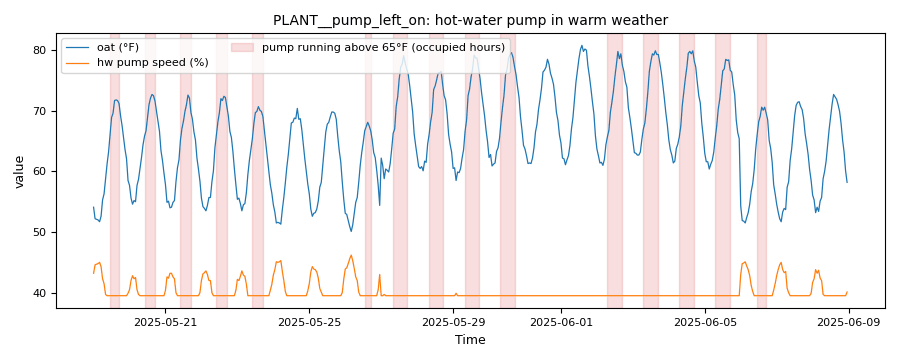
From this exercise's synthetic plant PLANT__pump_left_on: the hw_pump_summer_lockout evidence trend, the outdoor temperature (°F) and the pump's speed (%) on one axis. The pump never stops; each shaded interval is an occupied hour it ran with the outdoor temperature above the 65 °F lockout.
Caveats
- The data are synthetic: CAMBER's own model of one plant, built to show these faults. They show what the rules see, not how real plants behave; never cite them as evidence about a building.
- Both rules judge occupied hours only (weekdays 07:00 to 18:00 by default), so a pump running every night is counted in its occupied hours only.
- The trend is hourly: a firing or a pump run shorter than an hour is invisible.
- A plant that serves dehumidification reheat or domestic hot water needs heat in warm weather; its lockout is higher, or the check does not apply.
Going further
- Read the boiler plant exercise: its pump runs every hour of the year. Add
hw_pump_summer_lockoutto that exercise's config and see what the rule says about it. - Build the RCx report of the default config
(
camber report lock.json --out lock-rcx.html --layout rcx) and read the "Verify on site" checklist of a failing plant: the 65 °F lockout is listed as a rule default to confirm against the site's own sequence.