Dirty filters and a hunting valve
Workbook exercise air-maintenance · PNNL re-tuning chapters 5 and 9 · about 40 minutes
Goal
Find an air filter that is due for a change and a cooling valve whose control loop hunts. No open dataset in the catalog shows either fault. Then find out how much each verdict depends on the window the rule judges and on how often the trend is sampled.
Learn more
Read these first (PNNL, free):
- Chapter 5: Air Handling Units of the re-tuning training, for reading an air handler's trends before you change anything.
- Chapter 9: Building Walk Down, the reference
filter_foulingcites: its air-handler walk-down lists dirty, plugged or collapsed filters among the things to inspect. A trend tells you which unit to open first. - Trending Requirements for Re-Tuning: which points to trend, at what interval and for how long. Steps 6 and 7 show why the interval matters here.
Datasets and licence
synthetic-ahu-maintenance: a synthetic air handler that CAMBER generates on your computer. Nothing is downloaded and no real building is behind it. It holds the outdoor temperature, the supply fan's run status, the supply-air temperature, the cooling valve command and the differential pressure across the filter bank, every 5 minutes for two weeks of early summer. The unit runs every day from 05:00 to 21:00. Licence Apache-2.0 (CAMBER's own; the data may be shared). About 0.9 MB. See synthetic datasets for how CAMBER generates it.
The same weather and the same schedule drive five units, each ingested as AHU__<unit> in the
facility ds-synthetic-ahu-maintenance: AHU__healthy, AHU__loading, AHU__dirty,
AHU__hunting and AHU__near_miss. Which is which is the exercise; the instructor key
describes how each was built.
Setup
In the lab
- Run
camber laband open the URL it prints (http://127.0.0.1:8765/lab?token=...). - Tick
synthetic-ahu-maintenance(its kind readssynthetic) and press Fetch & ingest. CAMBER generates the file instead of downloading it, then ingests it like any other dataset. - When the job is done, the row links to trends (the trend viewer) and to report, the audit report of the dataset's template at the trend's own 5-minute resolution. The lessons in steps 5 to 7 below use the command line.
On the command line
camber datasets fetch synthetic-ahu-maintenance
camber datasets ingest synthetic-ahu-maintenance --store lab_store
camber datasets config synthetic-ahu-maintenance --exercise air-maintenance --store lab_store --out ahu.json
camber run ahu.json --out ahu_out
camber datasets score synthetic-ahu-maintenance --store lab_store --findings ahu_out/findings.json
The exercise's config (--exercise air-maintenance) runs two rules at their defaults on the
5-minute trend: filter_fouling (the filter's differential pressure) and control_hunting (the
cooling valve's reversals). Three variants run one rule each: filter_fouling on the second week
only, and control_hunting on the same data resampled to 10 and to 15 minutes:
camber datasets config synthetic-ahu-maintenance --exercise air-maintenance--lastweek --store lab_store --out ahu_week.json
camber run ahu_week.json --out ahu_week_out
camber datasets config synthetic-ahu-maintenance --exercise air-maintenance--10min --store lab_store --out ahu10.json
camber run ahu10.json --out ahu10_out
camber datasets config synthetic-ahu-maintenance --exercise air-maintenance--15min --store lab_store --out ahu15.json
camber run ahu15.json --out ahu15_out
Steps
- Look before you judge. In the trend viewer, plot each unit's filter differential pressure with the supply fan status over the whole fortnight. Then plot each unit's cooling valve and supply-air temperature over one morning, zoomed in until you can see single 5-minute samples.
- Run the exercise's config (the commands above). For each unit, read
filter_foulinginahu_out/findings.json: the severity,filter_dp_median_inwc,pct_over_thresholdandfilter_dp_p95_inwc. - The valves. Read
control_huntingfor each unit:reversals_per_hr,reversalsandmax_resolvable_per_hr. - Score. Run
camber datasets scoreand read the rates for the two rules. - Judge the last week. Run the
lastweekvariant and compareAHU__loadingwith step 2. - Sample it every 10 minutes. Run the
10minvariant. Compare each unit's severity andreversals_per_hrwith step 3, and read the caveats. - Sample it every 15 minutes. Run the
15minvariant and read the severities, the rates and the caveats.
Questions
- Which filters does
filter_foulingflag over the fortnight, and how badly? What dopct_over_thresholdandfilter_dp_p95_inwcsay about the filter that passes but rose the most in your step 1 plot? - What share of the run is the fan off, what does a filter transmitter read then, and what does the rule do with those samples?
- Judged on the last week only, what does
filter_foulingsay aboutAHU__loading? What should the site do, and when should the next check run? - Which valve does
control_huntingflag, at what rate, and why not as a fault? What separatesAHU__near_missfrom it? - What does the label score say for the two rules over the fortnight, and on the last week for
filter_fouling? Which miss is the rule's, and which is the window's? - Resampled to 10 minutes, what does
control_huntingsay, and what doesreversal_share_of_maxshow about the hunting valve against the near miss? - Resampled to 15 minutes, what does the rule say, and why does it decline for a different reason than at 10 minutes?
What CAMBER shows
- Findings.
camber runprints one line per finding: one per rule and unit. - Filter.
filter_foulingreportsfilter_dp_median_inwc(the median differential pressure over the fan-on samples),pct_over_threshold(the share of those samples above the change-out pressure),filter_dp_p95_inwc,change_dp_inwcandn_masked_fan_off(the fan-off samples it set aside). It warns when the median reaches the change-out pressure (1.0 in. w.c. by default) and faults atfault_factor(1.5) times it. - Hunting.
control_huntingreportsreversals_per_hr(direction reversals beyond a 5 % deadband, per fan-on hour of the trend) on the worst of the unit's valves and dampers,reversalsandmax_resolvable_per_hr, the most reversals the trend's interval can show (one per sample). It warns at 6 an hour and faults at 12. When the interval cannot show the warn rate with a margin (its ceiling must be 1.25 times a threshold) it declines (info) with a caveat; when it cannot show the fault rate, a caveat says the severity is capped at warn. - Score.
camber datasets scoreprints the true- and false-positive rates for the entry's two declared detectors.
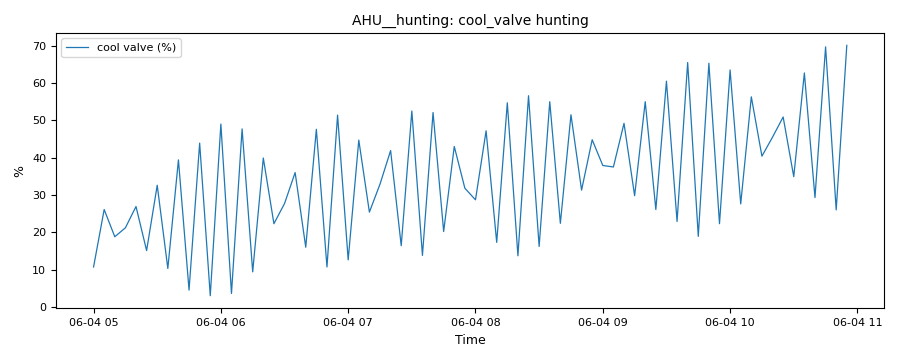
From this exercise's synthetic unit AHU__hunting: the control_hunting evidence trend, the cooling valve command over six hours of one morning, from the 05:00 start. Each swing that reverses by more than 5 % of stroke counts.
Caveats
- The data are synthetic: CAMBER's own model of one air handler, built to show these faults. They show what the rules see, not how real units behave; never cite them as evidence about a building.
- Both rules judge only the samples with the fan running (status, else speed, else airflow); a unit with no fan signal is judged over every sample, with a caveat.
filter_foulingdoes not correct for airflow. A filter's pressure drop rises with the air through it, so on a variable-volume unit a low fan speed reads as a cleaner filter. This unit is constant-volume.- The 1.0 in. w.c. change-out pressure is a generic default. A real filter's final resistance comes from its maker's data or the site's own change-out practice.
- A 5-minute trend can show at most 12 reversals an hour, the fault rate itself. To call a loop hunting as a fault, trend it every minute.
Going further
- Run
camber rules params filter_foulingandcamber rules params control_huntingto see where each default comes from and how to calibrate it. - Read the trend-quality exercise: which of its units' trends could show a hunting loop at all?