A sensor that reads 3 °F high: conditional findings and money at risk
Workbook exercise data-sensor-conditional · PNNL re-tuning chapters 4 and 5 · about 45 minutes
Goal
Two identical air handlers give two different sets of findings. Find out which differences come from the equipment and which from one sensor that reads a few degrees high. Then see what CAMBER's sensor checks can and cannot catch, what an independent reference adds, and how the RCx report separates the money it is sure of from the money that depends on a sensor you do not trust.
Learn more
Read these first (PNNL, free):
- Chapter 4: Trend Data Collection and Analysis of the re-tuning training: why every trend gets a sanity check before it is used to judge a sequence.
- Chapter 5: Air Handling Units, for reading the supply, mixed and return air together.
- AHU Discharge-Air Temperature Control: the supply-air temperature loop and its reset, and what a wrong reading does to them.
Datasets and licence
synthetic-ahu-sensor-bias: two synthetic variable-air-volume air handlers that CAMBER generates on your computer. Nothing is downloaded and no real building is behind them. They trend the outdoor, return, mixed and supply air temperatures, the supply-air setpoint, the outdoor-air damper, the supply airflow, the heating and cooling valves, the fan status and the occupancy point, every 15 minutes for three weeks of late spring. Licence Apache-2.0 (CAMBER's own; the data may be shared). About 0.3 MB. See synthetic datasets for how CAMBER generates it.
The facility ds-synthetic-ahu-sensor-bias holds AHU__healthy and AHU__sat_bias: the same
air handler with the same sequence, a fixed 55 °F supply-air setpoint. The site's design
sequence resets that setpoint from 55 °F up to 62 °F as the outdoor air falls from 70 °F to
60 °F; the BAS never does. For four weekdays in the second week a commissioning agent left a
calibrated logger in each unit's supply duct: LOGGER__healthy and LOGGER__sat_bias hold its
reading (supply_air_temp), and nothing outside those days.
Setup
In the lab
- Run
camber laband open the URL it prints (http://127.0.0.1:8765/lab?token=...). - Tick
synthetic-ahu-sensor-bias(its kind readssynthetic) and press Fetch & ingest. CAMBER generates the file instead of downloading it, then ingests it like any other dataset. - When the job is done, the row links to trends (the trend viewer) and to report. The steps below use the RCx layout on the command line.
On the command line
First the run before anyone checks the sensors, then the same run with the duct loggers as references:
camber datasets fetch synthetic-ahu-sensor-bias
camber datasets ingest synthetic-ahu-sensor-bias --store lab_store
camber datasets config synthetic-ahu-sensor-bias --exercise data-sensor-conditional--no-reference --store lab_store --out before.json
camber run before.json --out before_out
camber report before.json --layout rcx --out before_rcx.html
camber datasets config synthetic-ahu-sensor-bias --exercise data-sensor-conditional --store lab_store --out bias.json
camber report bias.json --layout rcx --out bias_rcx.html
Both configs run supply_air_control (the supply air against its setpoint),
supply_air_reset_compliance against the site's design reset (t_max 62, priced with the
reheat-coil capacities in report.rcx.loads) and leaking_valve; read their _comment. The
exercise's config adds one block under report.rcx, the references: each unit's supply-air
sensor against the logger in its duct.
{
  "references": {
    "AHU__healthy": {"supply_air_temp": {"equip": "LOGGER__healthy", "label": "duct logger"}},
    "AHU__sat_bias": {"supply_air_temp": {"equip": "LOGGER__sat_bias", "label": "duct logger"}}
  }
}
Steps
- Look before you judge. In the trend viewer, plot each unit's supply air, mixed air and setpoint with its two valves over one morning in the first week. Then add the logger's reading for a day in the second week.
- Run the config without references. For each unit, read the three rules in
before_out/findings.json:supply_air_control'soff_setpoint_pct,leaking_valve'shw_leak_pct,median_delta_fandn_both_closed, andsupply_air_reset_compliance'spct_below_targetandmean_gap_f. - Ask the sensor checks. Open
before_rcx.htmland find the sensor-trust table in the data section. What does it say about each unit'ssupply_air_temp? - Read the report. Read the executive summary: each issue's rank, cost and confidence, the total, and anything at risk.
- Bring in the references. Open
bias_rcx.htmland find the table of sensors against their references in the data section. - Read the report again. Compare its executive summary with step 4: the totals, each issue's confidence, and the new sensor issue.
Questions
- Which rules flag which unit? For each flag on
AHU__sat_bias, is it the equipment or the reading? - Why does
supply_air_controlpass a unit whose supply air is 3 °F colder than its setpoint? - Why does
leaking_valvecall a heating-valve leak onAHU__sat_bias, and what would you check on site before replacing a valve? - What does the sensor-trust table say about the biased sensor, and why can no check of one trend catch this fault?
- Before the references, what does the RCx report price, and what is at risk?
- What do the logger comparisons show for each unit?
- After the references, which findings are conditional, on what, and what moved from the firm total to the at-risk total? Why does the healthy unit's identical reset finding stay firm?
- Is the at-risk reset estimate too high or too low, once the sensor is fixed?
What CAMBER shows
- Findings.
supply_air_controlreportsoff_setpoint_pct, the share of occupied running samples more than 2 °F from the setpoint.leaking_valvereads the supply air against the mixed air with both valves shut:hw_leak_pctis the share more than 3 °F beyond its 2 °F fan-heat allowance,median_delta_fthe median rise beyond it andn_both_closedthe samples it judged.supply_air_reset_compliancereportspct_below_targetandmean_gap_fagainst the configured reset map (target_source"configured"; the summary reads "vs configured target"). - Sensor trust. The RCx report's data section scores every point from its own trend:
coverage, flatlines, outliers, range and the cross-sensor checks. A sensor that is
untrusted, stuck, a copy of another point or failing the mixed-air checks makes the findings that read it conditional. See Sensor health. - A reference.
report.rcx.referencescompares a unit's point with a reference it should track (another equipment's reading in the store, or a CSV file), the same comparison as the OAT reference:bias(warn at 2 °F, fault at 5 °F), drift per month (evaluated over 28 days or more), RMSE and correlation, in a table in the data section. A warn or fault is asensor_drift:<role>issue on that unit, and the unit's findings that read the point become conditional. See Sensor references. - Conditional and at risk. A conditional issue keeps its verdict and its estimate, at confidence L, and names the sensor it depends on. The report adds its dollars to "at risk pending a sensor fix", not to the firm total. See the RCx report.
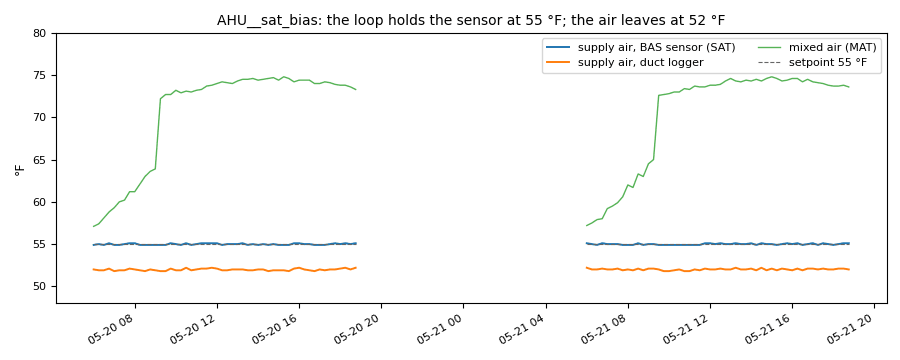
From this exercise's synthetic unit AHU__sat_bias: two occupied days of its supply-air sensor, the duct logger in the same duct, the mixed air and the setpoint. The loop holds the sensor at 55 °F; the air leaves at 52 °F.
Caveats
- The data are synthetic: CAMBER's own model of two air handlers, built to show this fault. They show what the rules and the sensor checks see, not how real units behave; never cite them as evidence about a building.
- A reference is only as good as its own calibration and placement: a logger in a stratified duct, or a few inches from a coil, disagrees with a good sensor too.
- Four days measure a bias, not a drift:
drift_per_monthneeds 28 days of overlap. - The healthy unit's fixed setpoint is a real finding on both units. Only the biased unit's copy depends on a sensor you do not trust.
Going further
- Run
camber rules params leaking_valveandcamber rules params supply_air_reset_complianceto see where each default comes from. - Read the trend-quality exercise: which sensor faults does the trust layer catch on its own?