A G36 VAV fleet: rogue zones, starved cohorts and resets
Workbook exercise zone-g36-fleet · PNNL re-tuning chapters 5 and 7 · about 60 minutes
Goal
An air handler that resets its supply-air temperature and its duct static pressure by trim-and-respond, as ASHRAE Guideline 36 lays out, serves its zones only as well as the requests they send it. Find a zone that drags a reset for everyone, a whole group of zones short of air at once, a reset that ignores its requests, and boxes that reheat more air than they need to. Then decide, for each, whether the fault is in a zone, in the air handler or in the reset itself. No open dataset in the catalog trends the reset requests these checks need.
Learn more
Read these first (PNNL, free):
- Chapter 5: Air Handling Units of the re-tuning training: resetting the supply-air temperature and the duct static pressure, and what to trend to see a reset at work.
- Chapter 7: Terminal Units in Air Distribution System: what each VAV box asks of its air handler, and how one box can hold a reset where the others do not need it.
- Zone Heating and Cooling Control, the re-tuning guide on terminal units: reheat at minimum airflow, and zones that heat and cool at once.
Datasets and licence
synthetic-g36-vav-fleet: a synthetic VAV system that CAMBER generates on your computer. Nothing is downloaded and no real building is behind it. Each air handler trends its supply-air temperature and duct static pressure with their setpoints, and the reset requests its boxes sent it for each. Each of its six single-duct reheat boxes trends its space temperature and setpoints, its airflow and minimum airflow setpoint, its damper and its reheat valve. The data is hourly, for three weeks of spring, and the units run weekdays from 05:00 to 19:00. Licence Apache-2.0 (CAMBER's own; the data may be shared). About 0.9 MB. See synthetic datasets for how CAMBER generates it.
The same weather drives eight air handlers, each ingested with its boxes in the facility
ds-synthetic-g36-vav-fleet: AHU__<name> and VAV1__<name> to VAV6__<name>, where the name
is one of healthy, rogue_sat, rogue_static, starved, not_responding, reheat,
heat_cool and near_miss. Boxes 1 to 4 face east, west, south and north; boxes 5 and 6 are
interior. What each name hides is the exercise; the instructor key describes how each was built.
Setup
In the lab
- Run
camber laband open the URL it prints (http://127.0.0.1:8765/lab?token=...). - Tick
synthetic-g36-vav-fleet(its kind readssynthetic) and press Fetch & ingest. CAMBER generates the file instead of downloading it, then ingests it like any other dataset. - When the job is done, the row links to trends (the trend viewer) and to report, the audit report of the dataset's template. The steps below use the command line.
On the command line
camber datasets fetch synthetic-g36-vav-fleet
camber datasets ingest synthetic-g36-vav-fleet --store lab_store
camber datasets config synthetic-g36-vav-fleet --exercise zone-g36-fleet --store lab_store --out g36.json
camber run g36.json --out g36_out
camber datasets score synthetic-g36-vav-fleet --store lab_store --findings g36_out/findings.json
The exercise's config (--exercise zone-g36-fleet) runs twelve rules over all 56 pieces of
equipment and declares which boxes each air handler serves (its topology). Most of the rules
are fleet rules: they read many pieces of equipment at once and write one finding, on
<fleet>, for all of them. Four variants keep one air handler each, so a fleet rule judges that
one alone:
camber datasets config synthetic-g36-vav-fleet --exercise zone-g36-fleet--healthy --store lab_store --out g36_healthy.json
camber run g36_healthy.json --out g36_healthy_out
camber datasets config synthetic-g36-vav-fleet --exercise zone-g36-fleet--near-miss --store lab_store --out g36_near.json
camber run g36_near.json --out g36_near_out
camber datasets config synthetic-g36-vav-fleet --exercise zone-g36-fleet--reheat --store lab_store --out g36_reheat.json
camber run g36_reheat.json --out g36_reheat_out
camber datasets config synthetic-g36-vav-fleet --exercise zone-g36-fleet--heat-cool --store lab_store --out g36_heatcool.json
camber run g36_heatcool.json --out g36_heatcool_out
Steps
- Look before you judge. In the trend viewer, plot
AHU__healthy's SAT setpoint with its SAT requests over one week, then its duct static setpoint with its static requests. Do the same forAHU__rogue_sat,AHU__starvedandAHU__not_responding. Then plot one box of each with its space temperature, cooling setpoint, damper and airflow. - Run the exercise's config (the commands above). Read
sat_reset_effectivenessandstatic_reset_effectivenessfor each air handler: the severity,reason,failure_modes,actual_sp_range,expected_sp_rangeandpct_high_demand_unresponsive. - The rogue zones. Read the two rogue-zone censuses on
<fleet>:rogue_by_group,worst_zone,worst_zone_share, the static census'soverloaded_zones, and each box'szone_request_shareandzone_binding_frac. - The starved cohorts. Read the two cohort-starvation censuses:
starved_groups,worst_groupandgroup_sustained_frac. - Peers. Read
cohort_airflowandcohort_space_temp: theiroutliersandz. - Reheat. Read
reheat_minimization_g36for each box andzones_heat_cool_censuson<fleet>. Then run thereheatandheat-coolvariants and read the same two rules. - Comfort and airflow. Read
unmet_setpoint_hoursandairflow_trackingfor each box: which boxes fail, and behind which air handlers? - Score. Run
camber datasets scoreand read the rates for the five rules it scores. - The healthy fleet and the near miss. Run the
healthyandnear-missvariants and read every finding.
Questions
- Which air handler's resets does CAMBER flag, and why does the same fault give two different reasons for its SAT and its static reset?
AHU__rogue_sat's SAT reset is effective and its setpoint spends the afternoons at 55 °F. Is the reset at fault? Which zone drives it, and what share of the requests does it send?- Which box does the static-pressure census flag, and which box does it list as overloaded instead? Why is that one not a static rogue?
- Which air handlers does each cohort-starvation census name? How do the reset findings tell
AHU__starvedandAHU__not_respondingapart, and what would you check first on each? - Which boxes run unlike their peers on airflow, and on space temperature? Why does
cohort_airflowcompare each box only with the others of its air handler? - Which boxes does
reheat_minimization_g36flag? What doeszones_heat_cool_censussay about thereheatboxes alone, and about theheat_coolboxes alone? What setpoint would you look at onheat_cool? - Which boxes fail
unmet_setpoint_hoursandairflow_tracking? Which box doesairflow_trackingfind thatunmet_setpoint_hoursmisses, and why? - What does the label score say, and which of the faults can it not score at all?
- On the healthy fleet alone, does any rule flag something, the per-box comfort and airflow rules included? What separates the near miss's zone 1 from a rogue?
What CAMBER shows
- Findings.
camber runprints one line per finding: one per rule and air handler or box for the per-equipment rules, and one on<fleet>for each fleet rule. - Resets.
sat_reset_effectivenessandstatic_reset_effectivenessrebuild the setpoint a trim-and-respond reset should have reached from the air handler's own request counts and compare it with the trended setpoint. They warn when it isstuck(flat while the requests would have moved it),not_responding(at its energy-saving end where the requests had moved the rebuilt setpoint away from it),not_trimming(at its demand end where the rebuilt setpoint had trimmed away) ordiverges(moving the wrong way).reasonis the first of these andfailure_modeslists every one that holds. - Rogue zones. The rogue-zone censuses rebuild each box's reset requests from its trends
(SAT: 3 or 5 °F above the cooling setpoint; static: the damper over 95 % open, and the airflow
below 70 % or 50 % of its setpoint) and flag a box that holds the largest request on at least
half the cycles with any request and sends a large share of its air handler's requests
(at least 30 %, and at least two boxes' worth). They count only cycles with the fan on and the
building occupied. The static census lists a flagged box that sits 3 °F or more above its
cooling setpoint on at least half its static requests under
overloaded_zonesinstead: it is short of cooling, not of air. - Starved cohorts. The cohort-starvation censuses flag an air handler when at least 75 % of its boxes request at once on at least half the cycles with any request.
- Peers.
cohort_airflowandcohort_space_tempflag a box whose mean lies more than 3.5 robust standard deviations from the others' median;cohort_space_tempalso needs the mean to differ from the median by 1 °F or more. - Reheat.
reheat_minimization_g36faults a box when, of its occupied hours with the reheat valve open, 40 % or more have its airflow over 1.2 times its minimum outside Guideline 36's high heating loop (warn at 15 %), where a dual-maximum box raises its airflow by design. With a heating-loop point (zone_heat_loop, trended here) an hour with the loop over 50 % counts as the high heating loop; without one, the valve at 90 % or more.zones_heat_cool_censuscounts the occupied hours with one box heating (its valve open) while another cools (its valve shut, its airflow over 1.1 times its minimum), and faults when 75 % of the hours have one (warn at 25 %). Both read the trended occupancy point. - Comfort and airflow.
unmet_setpoint_hoursfaults a box when its space is more than 1.5 °F outside its setpoints on 15 % or more of occupied hours (warn at 5 %);airflow_trackingfaults one whose airflow misses its setpoint by more than 20 % on 25 % or more of its occupied fan-on hours (warn at 10 %). - Score.
camber datasets scorescores only the rules that judge one piece of equipment.
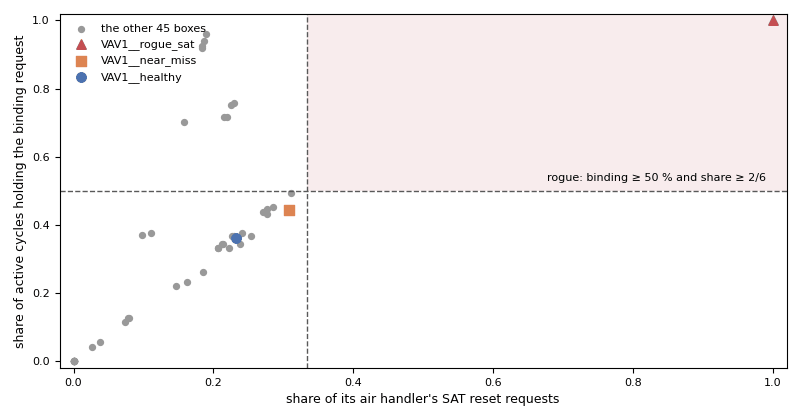
From this exercise's synthetic air handlers: the SAT rogue-zone census for every box. A box is a rogue only in the shaded corner, where it both sends a large share of its air handler's requests and holds the largest request on half the cycles or more.
Caveats
- The data are synthetic: CAMBER's own model of a VAV system, built to show these faults. They show what the rules see, not how real systems behave; never cite them as evidence about a building.
- The resets here take three trim-and-respond steps per trended hour (a 20-minute step), and the trend keeps each hour's last one, so the reset rules rebuild them closely but not exactly. A real controller steps every few minutes; on an hourly trend of one, the rebuilt trajectory is coarser still.
- The fleet rules write one finding for everything they see. To judge one air handler, keep only its equipment (the variants do), and declare the served-by topology: without one, the censuses guess the grouping from the equipment names.
- Each box trends its active airflow setpoint (
airflow_sp) apart from its minimum (airflow_min_sp), and its heating and cooling loops, so the censuses count about as many requests as the air handlers did (SAT_REQ,DSP_REQ). The cooling loop is the zone's cooling demand as a share of its cooling maximum, a simplification of G36's sequence.
Going further
- Run
camber rules params sat_rogue_zone_censusandcamber rules params reheat_minimization_g36to see where each threshold comes from. - Read the bad-box exercise: which of its rules are fleet rules, and what does its topology come from?